5 from 3 votes
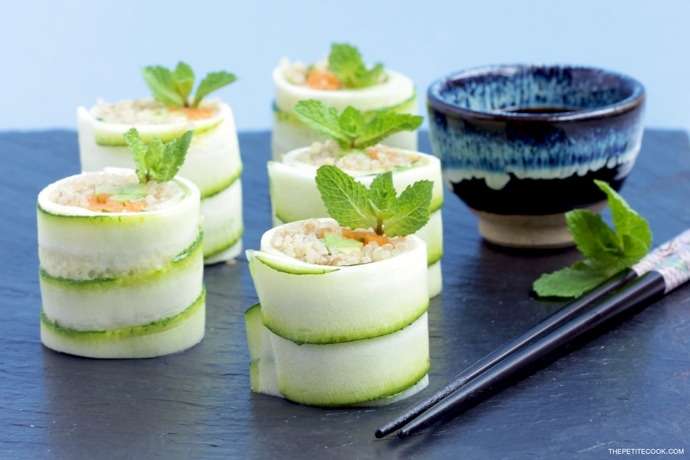
Vegan Zucchini Quinoa Sushi Rolls
Whether you're entertaining or relaxing, this recipe hits the spot.
Prep Time
15 mins
Total Time
15 mins
Servings:
8
Course:
Appetizer
Cuisine:
Vegan
Ingredients
- 1 cup quinoa cooked
- 2 zucchini small-medium
- 1 carrot cut into strips
- 1 avocado cut into strips
- mint chopped, fresh, leaves, a bunch
- soy sauce light, to serve
- wasabi to serve
Instructions
- Cover with cling film a bamboo sheet. In the meantime, cut the zucchini lengthwise into very thin strips with the help of a peeler.
- Arrange the thin zucchini slices slightly overlapping each other, carrying on until you have a long strip enough to make 4 rolls out of it.
- Consider a couple of extra cm per side, as the edges will be chopped off to ensure all rolls are even.
- Place ½ cup of quinoa on top, press a thin layer of quinoa onto the bottom. Make sure you have a even layer that covers horizontally half the zucchini bed.
- Arrange carrots and avocado into a long even strip on top of quinoa.
- Start to roll up, making sure to keep the roll tight, and gently pressing down with your fingers all the way until you reach the end. Be careful not to squeeze out the roll filling.
- Once the roll is ready, you can cover in cling film and refrigerate for 15 mins to firm it up. Or you can use a sharp knife and carefully cut it into 4 even rolls, chopping the two ends off.
- Serve accompanied by soy sauce and wasabi, or refrigerate for up to 3 hours and serve later.
Cup of Yum