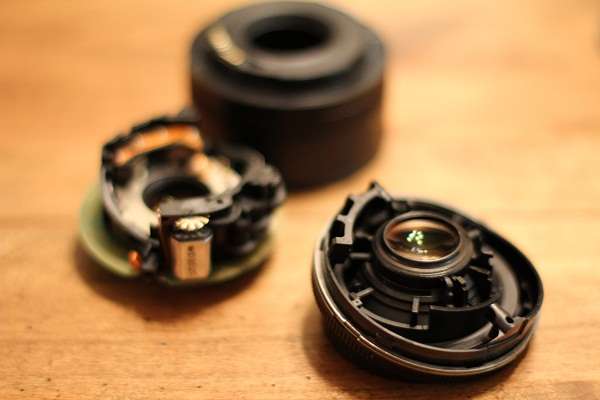
Removing a Stuck Canon 50mm f/1.8 Camera Lens
User Reviews
5.0
3 reviews
Excellent
-
Prep Time
5 mins
-
Cook Time
5 mins
-
Total Time
10 mins
-
Servings
1 Un-Stuck Lens
-
Course
Main Course
Removing a Stuck Canon 50mm f/1.8 Camera Lens
Report
How to undo a silly mistake
Share:
Ingredients
- Camera with stuck lens
- 1 bar of chocolate or ½ chocolate cake for comfort purposes
Instructions
- Keep your camera powered off and don’t try to take pictures. Your lens is broken, the pictures won’t be pretty anyway.
- Breathe and remember this loss is your perfect excuse for purchasing a better lens
- Collect your tools (small Philips screw driver and small needle nose pliers).
- Remove the guts of the lens (glass and plastic ring) by pulling them out or simply turning the camera over to allow gravity to let them fall out (mine just fell out because the lens was already broken). Note: In the first picture of the post, the "guts" are the piece of the lens that is closest.
- The outer part of the lens will be attached and there will be a big hole where the guts used to be. It is important that you don't let anything fall into this space because now your camera is unprotected.
- Using a small Philips screw driver, unscrew the two small screws on the inside of the lens.
- Turn your camera over (lens down) or tilt it downward so that no dust or camera parts fall inside of the body.
- Turn the lens to where it stops.
- Using needle nose pliers, lift the piece of plastic that is hitting the gold-plated studs (which is the electrical connection between the lens and the camera).
- You can see in the part of the lens that I'm holding (below the gold stud part) that there's a badly chewed piece of plastic. This piece of plastic broke when Garrett was pulling the lens up over the connection. It doesn't matter if you break parts of the lens since it's already toast but you want to be sure nothing happens to the camera.
- Pull the plastic up over the gold-plated studs while turning the lens. The lens should come off.
- Hallelujah, order a better one, that’s what the ol’ credit card is for!
Genuine Reviews
User Reviews
Overall Rating
5.0
3 reviews
Excellent
Other Recipes
You'll Also Love